Best Mac Window Manager in 2026 :Why Dirisha Is the Smarter Way to Organize Your Mac
If you’re looking for a better way to organize your apps, a mac window manager can completely change how you use your Mac.
While macOS has improved window snapping in recent updates, many users still rely on tools like Rectangle or Magnet to stay productive. But in 2026, window management is evolving beyond simple snapping — and newer tools are starting to offer something much more powerful.
Instead of just moving windows around, modern tools are focused on helping you control your entire workspace.
What is a Mac Window Manager?
A mac window manager is a tool that helps you organize and position app windows on your screen more efficiently.
At a basic level, most window managers let you:
snap windows to different parts of your screen
resize apps quickly
move windows between displays
But that’s only the beginning.
Newer macOS window managers go further by letting you:
save groups of apps
restore full layouts instantly
switch between different workflows without rebuilding your setup
Instead of manually arranging your screen every time you start working, your workspace becomes something you can reuse.
Why the Default macOS Window Management Isn’t Enough
Even with recent updates, macOS still requires a lot of manual setup.
If you’ve ever…
opened the same apps every morning
dragged windows into roughly the same positions
resized everything by hand
fixed your layout after unplugging a monitor
…then you’ve already felt the limitations.
The problem isn’t just window movement — it’s repetition.
Most people rebuild the same workspace over and over again without realizing how much time it costs.
Best Mac Window Managers in 2026
Rectangle
Rectangle is one of the most widely used mac window managers.
What it does well:
free and lightweight
keyboard shortcuts for snapping
simple and reliable
Limitations:
only manages one window at a time
no concept of saved workspaces
requires manual setup every session
Magnet
Magnet is a polished alternative with similar functionality.
What it does well:
• smooth snapping experience
• easy to use
• solid performance
Limitations:
• still focused on individual window control
• no workspace automation
• limited multi-monitor workflow support
Dirisha (A Different Approach)
Dirisha takes a completely different approach to what a mac window manager can be.
Instead of focusing on individual windows, it focuses on your entire workspace.
Dirisha is designed to help you save, organize, and instantly restore the app layouts you use every day
What Makes Dirisha Different
1. Save Complete Workspaces
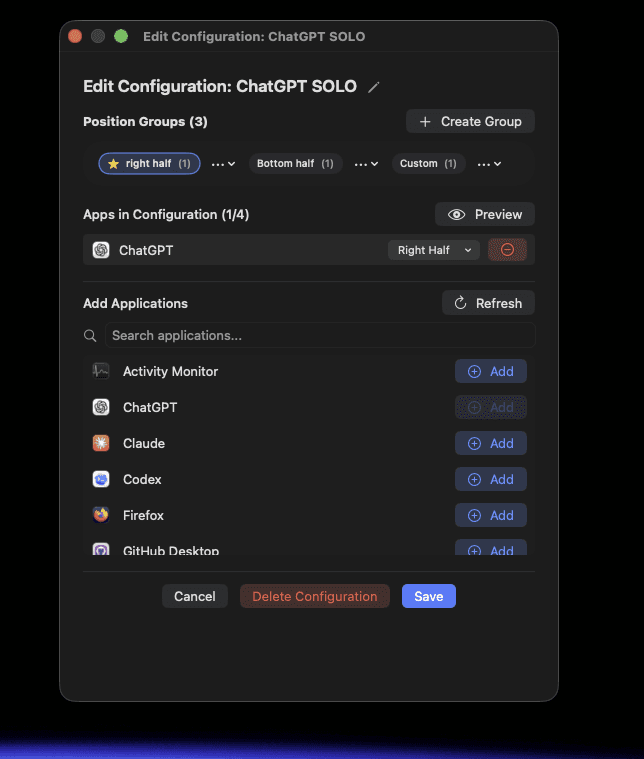
With Dirisha, you don’t just move windows — you create saved configurations of apps.
For example:
a writing setup (Notion + Safari)
a coding setup (Xcode + Terminal + Docs)
a research setup (browser + notes + references)
Each setup becomes reusable instead of something you rebuild manually.
2. Instantly Restore Your Layout
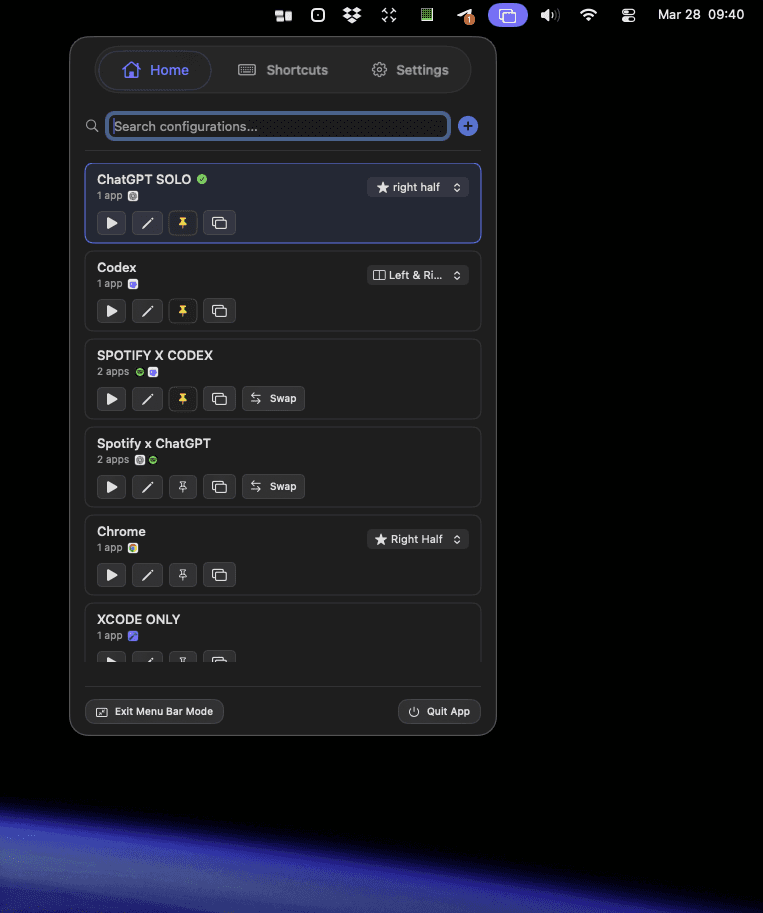
Instead of opening apps and arranging them one by one, you can apply a saved configuration in seconds.
Your apps:
launch automatically
move into position
resize exactly how you want
This removes one of the biggest sources of friction in your workflow
3. Go Beyond Window Snapping
Traditional tools stop at snapping windows.
Dirisha goes further by letting you:
manage multiple apps at once
switch between entire workflows
create different layout variations for the same setup
It’s not just window management — it’s workspace management.
4. Built for Multi-Monitor Setups
If you use multiple displays, you’ve probably experienced:
windows jumping to the wrong screen
layouts breaking after waking up your mac from sleep
constant manual fixing
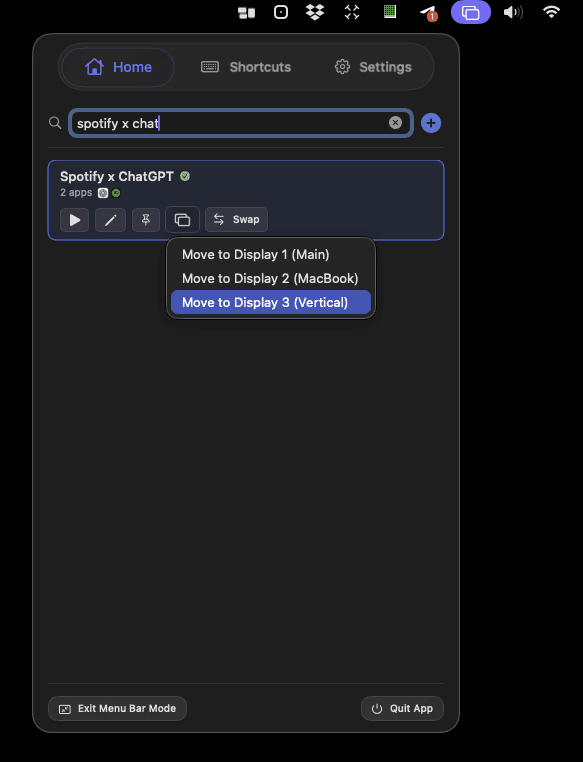
Dirisha lets you restore your entire multi-monitor layout instantly, keeping everything consistent and intentional.
5. Fast Activation with Shortcuts & Menu Bar
You can trigger your workspace:
• from the menu bar
• using keyboard shortcuts
• without interrupting your flow
This makes switching between tasks feel seamless.
Key Features to Look for in a Mac Window Manager
When choosing a mac window manager, here's what actually matters:
• Window snapping - quick positioning
• Saved layouts - reusable workspaces
• Multi-monitor support - consistent setups
• Keyboard shortcuts - speed and efficiency
• Workspace switching - faster context changes
Most tools only handle the first one.
Dirisha is built around the rest.
Feature | Dirisha | Magnet | Rectangle |
|---|---|---|---|
Keyboard Shortcuts | ✅ | ✅ | ✅ |
Window Snapping | ✅ | ✅ | ✅ |
Save App Layouts | ✅ | ❌ | ❌ |
One-Click Workspaces | ✅ | ❌ | ❌ |
Multi-Monitor Layout Restore | ✅ | ⚠️ Limited | ⚠️ Limited |
If you’re specifically comparing tools like Rectangle and Magnet, you can read a full breakdown 👉 here
Who Should Use a Mac Window Manager?
A mac window manager is especially useful if you:
• switch between tasks frequently
• use the same group of apps daily
• work across multiple monitors
• want a cleaner, more organized desktop
• value speed and focus in your workflow
Dirisha is particularly useful for:
• developers
• writers
• designers
• researchers
• students
• remote workers
Anyone who repeats the same workspace setup will benefit the most.
A Smarter Way to Work on Your Mac
Most mac window managers help you organize your screen.
Dirisha helps you start working instantly.
Instead of:
• opening apps
• dragging windows
• resizing everything
You move straight into your workflow.
Final Thoughts
If you've been using tools like Rectangle or Magnet, you already know how helpful a mac window manager can be.
But if you've ever wished you could:
• save your entire workspace
• switch between setups instantly
• stop rebuilding your layout every day
Dirisha offers a much more complete solution.
It's a different way of thinking about window management - one built around how you actually work.
Try Dirisha
If you’re exploring the best mac window manager in 2026, Dirisha is worth trying.
It keeps everything simple:
save your setup
reuse it anytime
stay in flow